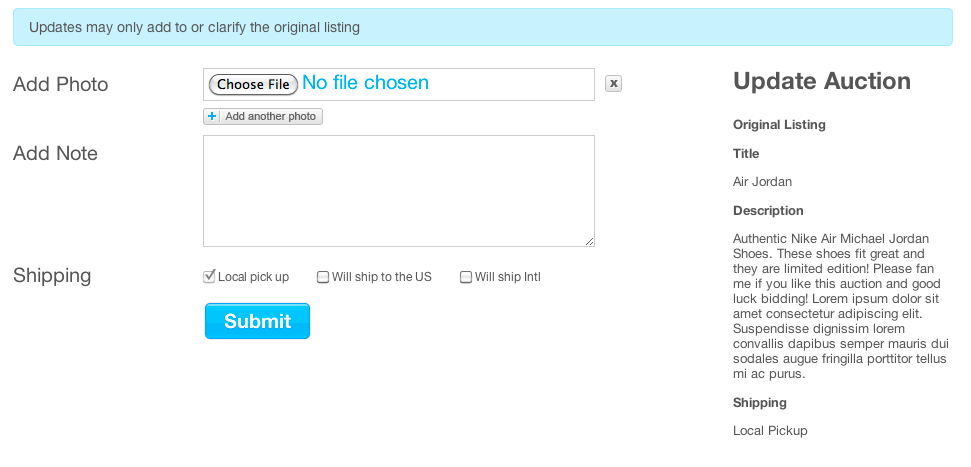
We’re excited to roll out our latest feature allowing Sellers to update their auction listing. Starting today, Sellers can add updates to their listing after bids have been placed. (This is only allowed if the information added is an improvement or clarification of the current information provided). Images and notes can be added to a listing and shipping options can be upgraded up to 24 hours before an auction ends. To update the listing, click the “Update” button on your auction page.
The page will show the original listing title, description and shipping information on the right. After entering the updated information, finish by clicking the “Submit” button. This feature eliminates the need to reserve space in the comment section. Instead, updates are displayed and documented on the auction page.
This feature does not allow Sellers to:
- Change any information in the original description
- Change or edit Title
- Increase Shipping Fee
- Remove images
Bidders are responsible for carefully reading a listing before placing a bid. Updates that contradict the original description and do not improve the listing are subject for removal.
We hope this feature will be helpful to all…and remember, we have lots more in store as we continue improving Listia for everyone. Thanks!
 The Listia Blog
*face palm* I had just noticed this feature on someone’s auction and went ape trying to figure it out!! I should have come here first thing!!! Thanks listia for this new seller feature. it ROCKS
Thank you, Thank you, Thank you!! There have been many times when I would’ve liked to add a photo, or provide more info. This is going to make it so much easier on sellers and will benefit the buyers as well! Way to go, Listia!!
I was more than happy to find this page. I wanted to thank you for ones time for this particularly fantastic read!!
I definitely loved every bit of it and i also have you
saved to fav to see new stuff in your website.