Ctrl+S! Hello Saved Searches

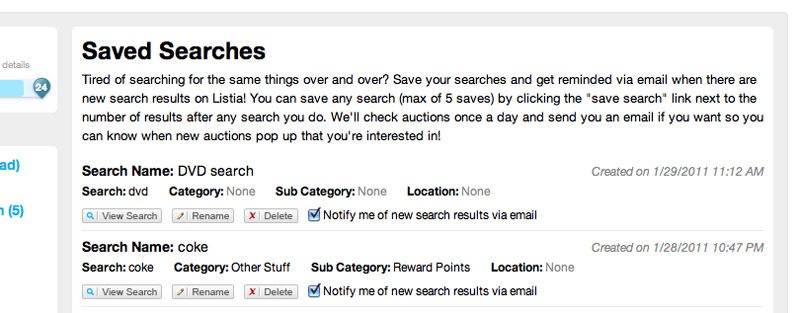
Ever get tired of searching for the same things over and over again? We’ve added a way for you to save your searches so you don’t have to. Along with this, you can be notified via email when new auctions are found with your search.  Emails are sent once a day and you can always turn notifications off.  To save a search look for a link next to the number of search results called “save search”.  When you click this you’ll be prompted to name your search so you can reference it later on and you can also choose to receive email notifications or not.

Saved_searches1

In “My Listia” there is a new menu under “Account Settings” titled “Saved Searches” and here you can manage your settings as well as view results from your searches. There is currently a maximum of 5 saved searches. Enjoy!
Saved_searches2

Listia Tip! Next & Prev Buttons On Larger Images

We decided to use a light weight image gallery for viewing larger images and we decided to utilize Slimbox2 for the time being.  Down the line we may eventually build our own way to zoom even further, but for now this light weight lightbox does a nice job. To view larger images click the “View Larger” link on any auction page that has photos uploaded. One thing you may not know is that you can flip through the images by clicking “Next” and “Prev” buttons that appear when you mouse over the side of the image. This is much easier than closing the lightbox then opening up another image.  Enjoy!

Browser Battle

Browsers

As the number of web browsers increases so do your choices on which one you use.  With the slow and gradual death of Internet Explorer 6 (thank heaven) there comes a whole slew of new IE versions (7, 8 and now 9 beta). Then throw in Firefox, Google Chrome and Safari … feels like you’re at Home Depot picking out what shade of blue to paint your room. To some of our users the choice may just be “what came with the computer”, but everyone should be open to try new things.  After taking a look at some of our statistics we were happy to see that less than 1% of our users use IE6 (thank you to those of you that have moved on).  BUT there are still quite a few of you out there using IE 7, 8 or 9 (we didn’t even know about 9 until we saw some stats). This wasn’t too shocking to us since IE still has a tight grip on a lot of people, but at the office you’ll never see anyone using IE unless it’s to do browser testing.

So we decided to run some quick tests in the office on Peacekeeper after running around like crazy to find a computer with IE.  We had seen a ton of reports online, but had to run these ourselves and share them with you guys.  Here are the results …

Browser_winner

Chrome looks like the blatant winner on this test suite. That conclusion probably is consistent with a lot of other test suites out there, but we thought we just had to see it for our own eyes. Never heard of Chrome or Firefox?  Click the links to check them out, but basically they’re alternatives to using Internet Explorer to browse the web. Download them and see if you like em … we do!

Perk-A-Boo! Introducing Listia Perks!

Perks

We hope everyone has been having a great 2011!  We’ve been cranking away at a lot of new features and here is our first one for 2011, Listia Perks!  Jump to this link if you want to read about it on your own.  You can find the link to perks on the left hand side of “My Listia” under “Account Settings”.

When a perk is activated you will have the ability for that perk immediately.  You activate and subscribe to perks based on a monthly subscription plan and they are renewed on the first day of each month.  To activate a perk, the initial cost is a prorated number of credits for the remaining days in the month as well as payment for the next month.  At any time you may cancel your subscription and you will have the ability for that perk until the next renewal period when your subscription is canceled.  When you activate a perk you will receive a badge for that perk indicating that you have that perk activated.  If you decide to cancel a subscription that badge will be removed on the next renewal day.  Each perk will have a different set of requirements to unlock it.  Some of you may already have them unlocked and others might need to put in a little work.  One last thing … pricing of perks is subject to change, but if you subscribe to a perk at a cheaper price you will be grandfathered in forever unless you cancel that subscription.

As time goes on we’ll be adding more and more perks, but not always with an announcement, so keep your eyes peeled!  Have fun!

A Startup Turning Trash into Treasure

Here at Listia, we think that reusing and recycling goods is a better idea than throwing old stuff away and buying new all the time.  However one of our fellow Y Combinator startups, Tuxebo is taking this idea to the extreme and using it to finance their bootstrapped startup by recycling and selling waste from dumpsters. We found the story so interesting, we just had to share 🙂

We first met the Tuxebo founders during the summer of 2009, and they are some of the hardest working startup founders you’ll ever meet. Their company, Tuxebo is a rental marketplace allowing users to search for stuff to rent locally. Users can compare hire prices, book and manage their hires online. It’s essentially an expedia for stuff to rent. Initially it focused on scaffolding and container hire but then it moved into what British people call skip hire.  Yes ladies and gents, it’s an online first, they started as an online marketplace for dumpster rental initially focusing on skip hire in London but then extended their reach to cover skip hire in Birmingham and other large UK cities.

Dumpster Diving

Recently Tuxebo received a request from a property company who wanted to hire a skip in Manchester .  Their enquiry said they were clearing a showroom of 16 kitchens made of granite, marble and appliances. The Tuxebo founders got together and agreed they would offer to remove the kitchens themselves for free.  They jumped in the car, drove to the warehouse and measured up the kitchens.  Two days later they were on ebay and two week later Tuxebo had netted £60,000 to help fund their startup out of recycling kitchens.  They set out on a 4000 mile road trip last week around the UK delivering these themselves and 7 days later are now moving out of their offices in Birmingham (an abandoned mental home where they pay pennies for rent) and moving to new offices in central London.

Most people think of recycling as an after thought and a cost.  Tuxebo saw recycling these kitchens as an opportunity to to trade up in true Listia style.  We hear Tuxebo just moved into toilet hire.  I think we’ll draw the line in recycling there though.


Happy New Year from Listia

Listia is looking forward to an awesome 2011, and we hope all of you are able to accomplish everything you set out to do this year.  So, from the entire Listia team.. 

Happy New Year!


New Year’s Resolution: Share More

Having trouble thinking of those New Year’s resolutions?  If so here’s an inspiring TED talk given by Rachel Botsman that is making it’s way around the web and it might give you some ideas other than “hit the gym more often”.  Enjoy!

http://video.ted.com/assets/player/swf/EmbedPlayer.swf

Holiday Gift Swap

4192070077_02e85bb9bd

We all get gifts during the holidays that we don’t really want… but instead of just dealing with it this year, Listia will help you swap those gifts for something you actually wanted!  For a limited time, you’ll get bonus credits just for listing your unwanted gifts or any other items around the house.  You can then use the credits you receive to get something you really want in return!  To get started, just visit the listing page for complete details…

Happy Holidays and Happy New Year from Listia!

photo via Mulberry24

New Features: “Get It Now” and Better Photo Uploading

We’re excited to announce that some long overdue features have finally been released!  The first one is called “Get It Now”, which has been our top feature request for as long as we can remember.  The other is a much better photo uploading system, which will make listing auctions much faster and prevent those gateway timeout errors that occur when listing auctions with lots of photos.  Basically, photos will begin uploading as soon as you select them, instead of waiting for you to click the submit button.  In many cases, they will be done uploading before you even finish typing the auction description!

Picture_53

What is “Get It Now”?  Here is a brief description of how it works:

Get It Now is an optional feature that lets sellers specify the exact amount of credits they would be willing to accept to end an auction early. Bidders would then have the option to “Get it Now” instead of going through the auction process and competing with other bidders. 

The Get it Now option is available throughout the duration of the auction, until a bidder has decided to use it. However, once bidding on the auction has reached 50% of the Get It Now value, the Get it Now option will be removed and can no longer be used. 

The Get It Now option is available for all sellers with the Seller Wings badge. 

Picture_52

Read about all the details here…

Thanks for everyone’s continued support and feedback!  We will continue to push out new and exciting features based on what everyone wants.

My Listia, Take 2

20791503_3f1dc5910f

Last Friday we pushed out a large change to the ‘Home’ and ‘Account’ pages, effectively merging them into a single new ‘My Account’ page.  In an effort to simplify the user experience and make navigating around Listia easier, we managed to elicit a whole range of feedback from our users.  Some users had the type of reaction we anticipated:

Being able to go to my messages with a quick click on the left. That’s a good addition. The whole bar on the left is good. 

Others didn’t feel quite the same:

I don’t care about anything EXCEPT what I’m dealing with, so I expect to only see what I’m dealing with when I click on MY listia.

Others still had mixed feelings:

I personally like the new setup for our account page. However, it does seem to be a little busy!

We received a TON of feedback (Thank you everyone who chimed in!), and read through every single post to understand the whole range of concerns.  We realized that those who liked the changes enjoyed the (1) increased navigability and (2) ability to explore new and interesting auctions from the same page.  Those who disliked it felt that the explore content was (3) impersonal and irrelevant, and more importantly (4) affected their ability to focus on and use the account pages.

We couldn’t agree more with these points. Today we’re rolling out a few changes that aim to keep the benefits provided by the ‘My Account’ page, but at the same time increase focus on the usability of the account features.  Some things to note about the changes:

We’ve removed the alternating pane showcasing featured auctions
The content wasn’t relevant enough to justify taking up such prime real estate on users’ browsers.

In its place you’ll find a condensed summary of recent auction activity
While the left menu provides an exhaustive view of your account, this lets people quickly see what’s going on and move on to the next task.

Explore content and auctions from people you’re a fan of are still shown
From the ‘My Account’ page you’re still able to check out interesting content from fans and others alike.

The open/closed state of the menu is saved across pages
To reduce clutter and keep the menu as tidy as possible, if you close a menu it will remain closed on the next page.

Our goal is to strike an ideal balance between account management and auction discovery, two things that we feel go hand in hand in creating a great Listia experience.

We hope everyone finds the changes helpful!

photo via Chuckumentary